Brevities: AI-powered webpage summaries for faster reading in Chrome
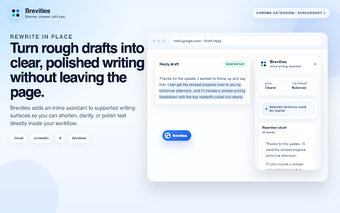
Brevities, developed by the Brevities team (brevities.app), is a Chrome extension built to reduce time spent reading long online articles. The app generates instant AI summaries of the active webpage so users can capture core ideas without reading every line. It pairs a compact interface with quick-access controls and customizable output options for different note-taking styles. Students, researchers, journalists, and professionals benefit by accelerating information triage and focusing follow-up reading on the most relevant material.
What the app actually does for online reading
The app extracts visible webpage text and returns a condensed version tailored to the user’s instruction set, using an external natural language service to produce readable results. That workflow targets large articles, blogs, and long-form pages where rapid comprehension is the goal. Because the app records a history of past summaries, users can revisit earlier captures without reprocessing the same page, supporting research sessions that span multiple browsing periods.
How it behaves during everyday browsing and performance trade-offs
The extension uses a lightweight approach designed for Chromium browsers, so it minimizes on-screen clutter while operating inside the browser process. Summary generation depends on sending page text to the external AI service, so response speed varies with network latency and the AI response time. The tool favors keeping the extension footprint small rather than running heavy local processing, which helps maintain responsiveness on typical desktop hardware.
What to expect about privacy and content access
The app connects to the user’s AI account to produce personalized output and processes only the page text visible in the active tab, which means it cannot reach content behind paywalls or inaccessible dynamic frames. The developer advises users to consult the extension’s privacy documentation because page text is submitted to the external language service for summarization, a behavior that affects how reading data is handled.
How customization, cross-browser availability, and reception shape workflows
The app accepts user-defined prompts and supports formatted outputs, letting readers request short bullet takeaways or longer analytical prose, and it stores a local summary history. It runs on Chrome and other Chromium-based browsers, so switching between desktop browsers preserves the same extension capability. User feedback highlights the compact interface and summary quality as useful for coping with information overload during research and daily reading.
A practical aid for quick comprehension, best used alongside source verification
The app is a pragmatic option for readers who need rapid distillation of long web content and prefer skimming before deeper study. It is not a substitute for careful source verification; summaries condense material and may omit nuance. Users who prioritize complete provenance or offline processing should treat summaries as starting points, then consult the original pages for citations and detailed evidence.
Pros
Generates instant AI summaries of active webpages
Compact interface that keeps the page uncluttered
Stores a searchable history of past summaries
Runs on Chrome and other Chromium-based browsers
Cons
Requires a connected AI account to generate summaries
Can only summarize content visible in the active tab
Summary speed depends on network and external AI response
Laws concerning the use of this software vary from country to country. We do not encourage or condone the use of this program if it is in violation of these laws. Softonic may receive a referral fee if you click or buy any of the products featured here.